Part Segmentation Datasets
Open in Colab · Download notebook
Part segmentation datasets provides labels on the parts of an object: a chair's legs, back and seat. ShapeNetPart is the standard benchmark for this task, with 16 categories, 50 part ids and roughly 16 900 shapes.
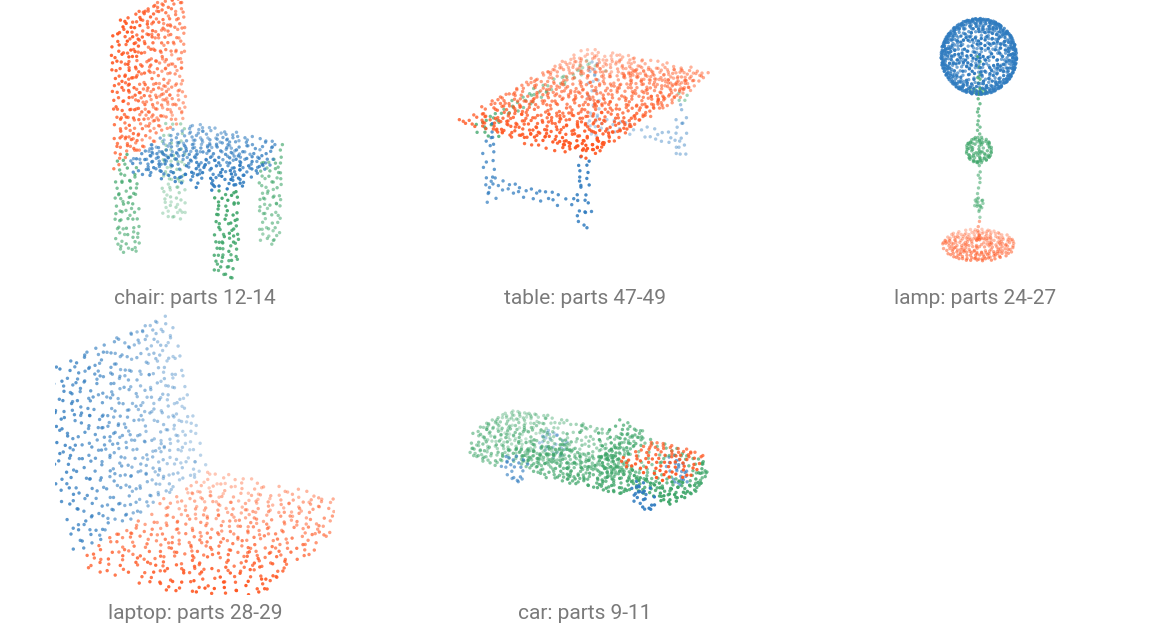
Part ids are global across the 16 categories: a chair owns 12-14 and a table 47-49, so one 50-way head covers every category. The colors above are each object's own segment field.
| Split | Samples |
|---|---|
train |
12 137 |
val |
1 870 |
test |
2 874 |
Load a dataset
Provide the data directory containing the datasets, here we are using the environment variable TORCH_POINTCLOUD_DATA_DIR to point to this data directory. If you don't have the dataset locally in this directory, use download=True to download it.
Once downloaded in the raw directory, the dataset is automatically preprocessed in the processed directory.
data/
├── ShapeNetPart/
│   ├── raw/
│   │   ├── 02691156/
│   │   ├── 02773838/
│   │   ├── ...
│   │   └── 04379243/
│   └── processed/
│       ├── train/
│       ├── test/
│       └── val/
└── ...
from torch_pointcloud.datasets import ShapeNetPart
from torch_pointcloud.config import DATA_DIR

dataset = ShapeNetPart(root=DATA_DIR, split="test")
print(f"Samples: {len(dataset)}")
print({k: tuple(v.shape) for k, v in dataset[0].items()})
You can use force_process=True or force_download=True to redo either step, and num_workers to parallelize the processing.
What a sample holds
| Key | Shape | Description |
|---|---|---|
pos |
\((N, 3)\) | Coordinates, already unit-normalized by the release |
normal |
\((N, 3)\) | Surface normals |
segment |
\((N,)\) | Part id in \([0, 50)\), global across categories |
category |
scalar | Object category index in \([0, 16)\) |
category is a plain integer here. Part-segmentation checkpoints read it one-hot, which their registered transform handles.
Categories and their parts
from torch_pointcloud.datasets import ShapeNetPart

print(list(ShapeNetPart.category_ids)[:5])
print(ShapeNetPart.seg_ids["Airplane"], ShapeNetPart.seg_ids["Mug"])
Restrict the dataset to a subset of categories with categories=:
from torch_pointcloud.config import DATA_DIR

dataset = ShapeNetPart(root=DATA_DIR, split="train", categories=["Chair"])
Use it with a checkpoint
The registered transform carries the checkpoint's whole preprocessing: it samples the point budget the checkpoint expects, subsamples normal and segment with the same indices, and one-hots category.
import torch_pointcloud as tp
from torch_pointcloud.datasets import ShapeNetPart
from torch_pointcloud.utils.data import PointCloudDataLoader
from torch_pointcloud.config import DATA_DIR

# Load the pretrained model
model, info = tp.create_model(
    "pointnext-sm.shapenetpart.openpoints",
    task="segmentation",
    pretrained=True,
    return_info=True,
)

# Pass the associated transform to the dataset
dataset = ShapeNetPart(root=DATA_DIR, split="test", transform=info["transform"])
dataloader = PointCloudDataLoader(dataset, batch_size=16, num_workers=6)

data = next(iter(dataloader))
print(f"Pos shape: {tuple(data['pos'].shape)}")
print(f"X shape: {tuple(data['x'].shape)}")
print(f"Category shape: {tuple(data['category'].shape)}")
category stacks to \((B, 16)\) because it is per object, while the per-point keys concatenate. See Part segmentation for the loop that scores it.