Quick Start
This page takes you from zero to running a pretrained model on a point cloud in about fifteen lines.
Run a pretrained model
Download the sample.ply point cloud from the ModelNet40 dataset:
import numpy as np
import torch
from plyfile import PlyData

import torch_pointcloud as tp
from torch_pointcloud.utils.data import collate

# Instantiate the model and return associated info.
model, info = tp.create_model(
    "pointnet2-ssg.modelnet40.xu-yan",
    task="classification",
    pretrained=True,
    return_info=True,
)
model = model.eval()

# Get associated transform for inference.
transform = info["transform"]

# Load input data.
ply = PlyData.read("sample.ply")["vertex"]
pos = np.stack([ply["x"], ply["y"], ply["z"]], 1).astype("float32")  # (N, 3)

# Apply the transform to the sample.
sample = {"pos": torch.from_numpy(pos)}
sample = transform(sample)

# Pack into a batch. The provided `collate` function
# handles the packed-batch convention, but you can use your own.
batch = collate([sample])

# Forward pass. Models take packed batches, never padded (B, N, ...) tensors.
with torch.no_grad():
    logits = model(batch.get("x"), batch["pos"], batch["batch"])

classes = info["weights"]["classes"]
top = logits.softmax(dim=-1).topk(3, dim=-1)
for index, score in zip(top.indices[0].tolist(), top.values[0].tolist()):
    print(f"{classes[index]:>12}  {score:.2f}")
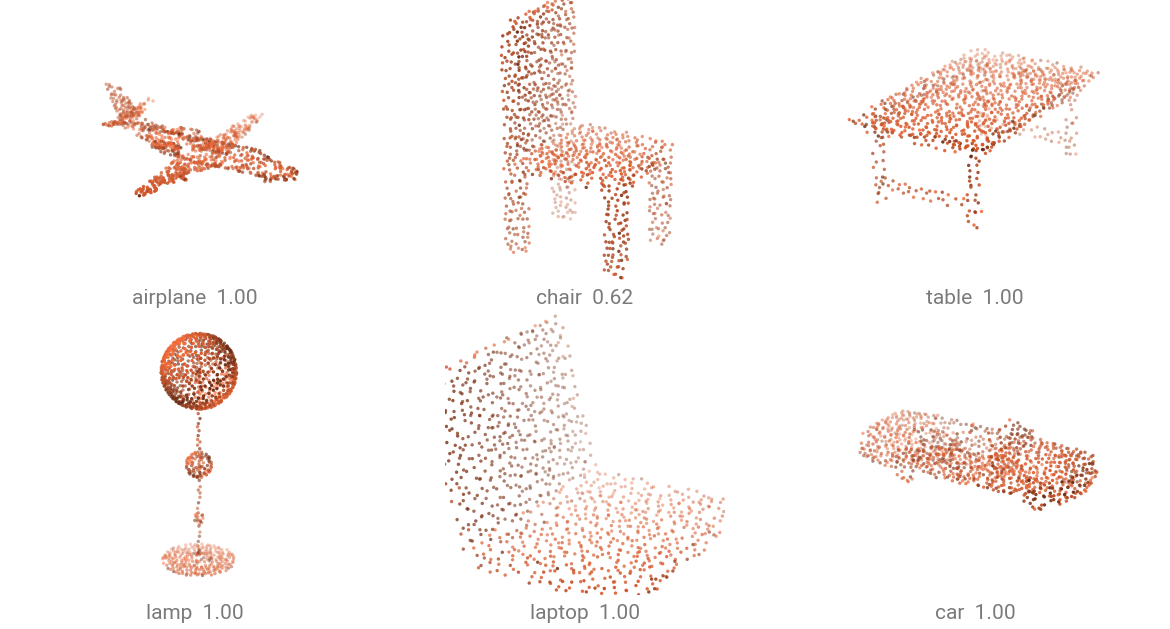
The packed-batch convention comes from PyTorch Geometric: instead of zero-padding clouds to a common size, we concatenate them and tag each point with its sample index. See Data conventions below.
Using a real dataset
The same model, over a whole dataset. ModelNetNormalResampled is what this checkpoint was trained on, and it ships
triangle meshes, so points are sampled from the faces before the checkpoint's own pipeline runs. It
downloads on first use.
import torch
import torch_pointcloud.transforms as T
from torch_pointcloud.datasets import ModelNetNormalResampled
from torch_pointcloud.utils.data import PointCloudDataLoader


dataset = ModelNetNormalResampled(
    root="data",
    train=False,
    download=True,
    transform=info["transform"],
)

dataloader = PointCloudDataLoader(dataset, batch_size=32)

with torch.no_grad():
    for data in dataloader:
        logits = model(data.get("x"), data["pos"], data["batch"])
        preds = logits.argmax(dim=-1)  # (32,) one class per cloud
        break
PointCloudDataLoader is a DataLoader with the packed-batch collate wired in: per-point tensors are
concatenated along the batch axis and a batch index is built for you, while scene-level tensors (label)
are stacked.
Data conventions
All point clouds use a packed (flat-batch) format (a.k.a. ragged tensors). This is what PyTorch Geometric uses. For a batch of \(B\) samples with \(N_i\) points each (\(N = N_1 + N_2 + \ldots + N_B\)):

| Tensor | Shape | Description |
|---|---|---|
pos |
\((N, 3)\) | 3D coordinates, all points concatenated |
x |
\((N, C)\) | Per-point features |
batch |
\((N,)\) | Per-point batch index \((0, \ldots, B-1)\) |
normal, color |
\((N, 3)\) | Per-point attributes |
segment |
\((N,)\) | Per-point semantic label |
label |
\((B,)\) | Scene / object-level label |