Detection Datasets
Open in Colab · Download notebook
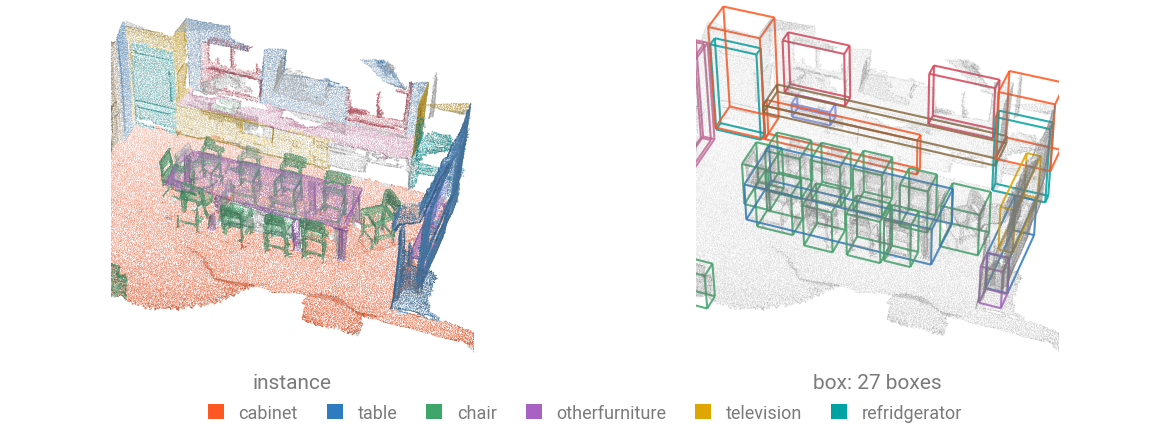
Detection datasets pair a scene with its boxes: a ragged \((K, 7)\) tensor and one class per box. Loaders that ship per-point instances instead of boxes can derive them.
| Dataset | Scenes | Classes | Boxes |
|---|---|---|---|
SunRGBD | 5 285 train / 5 050 val | 10 | oriented |
KITTI | 7 481 frames | 8 | oriented |
NuScenesMini | 404 keyframes | 10 | oriented |
ScanNet | 1 201 train / 312 val | 18 | from instances |
Load a dataset
Each dataset takes its data directory as root. Here that is DATA_DIR, which torch_pointcloud.config reads from the TORCH_POINTCLOUD_DATA_DIR environment variable. Pass download=True when the data is not there yet.
Once downloaded in the raw directory, the dataset is automatically preprocessed in the processed directory.
data/
├── SunRGBD/
│   ├── raw/
│   │   ├── SUNRGBD.zip
│   │   └── SUNRGBDtoolbox.zip
│   └── processed/
│       ├── train/
│       │   └── <scene>/
│       │       ├── pos.npy
│       │       ├── color.npy
│       │       ├── box.npy
│       │       └── class.npy
│       └── val/
└── ...
from torch_pointcloud.datasets import SunRGBD
from torch_pointcloud.config import DATA_DIR

dataset = SunRGBD(root=DATA_DIR, train=False, download=True)
print(f"Scenes: {len(dataset)}")
print({k: tuple(v.shape) for k, v in dataset[0].items()})
You can use force_process=True or force_download=True to redo either step, and num_workers to parallelize the processing.
What a sample holds
| Key | Shape | Description |
|---|---|---|
pos | \((N, 3)\) | Points, unprojected from depth (indoor) or LiDAR (driving) |
color | \((N, 3)\) | RGB, indoor only |
intensity | \((N, 1)\) | LiDAR return, driving only |
box | \((K, 7)\) | \((c_x, c_y, c_z, d_x, d_y, d_z, \theta)\), \(K\) varies per scene |
label | \((K,)\) | Class of each box |
Some datasets add their own keys on top of these.
Batch the ragged boxes
Boxes cannot be concatenated like points without losing which scene they came from. Pass them as cat_keys, and collate writes a matching batch_box index.
from torch_pointcloud.utils.data import DataKeys, PointCloudDataLoader

dataloader = PointCloudDataLoader(
    dataset,
    batch_size=8,
    cat_keys=[DataKeys.BOX, DataKeys.LABEL],
)

data = next(iter(dataloader))
print(f"Box shape: {tuple(data['box'].shape)}")
print(f"Batch box shape: {tuple(data['batch_box'].shape)}")
print(f"Pos shape: {tuple(data['pos'].shape)}")
batch_box[i] names the scene of box i, as batch[j] names the scene of point j. Losses and metrics read both.
Driving datasets
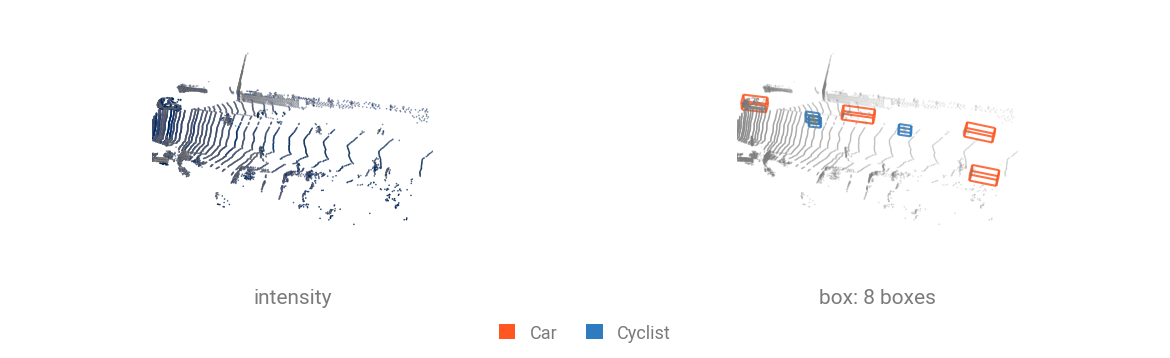
Outdoor frames carry intensity instead of color, and their boxes are oriented. Some need a manual download, because you have to accept their terms of use first.
Boxes from instance labels
ScanNet ships per-point instance and segment rather than boxes. InstanceToBox turns them into detection targets: one axis-aligned box per instance, classed by its majority semantic label.
import torch_pointcloud.transforms as T
from torch_pointcloud.datasets import ScanNet20

# Load one room of the validation set
scene = ScanNet20(root="data", split="val")[0]

# Derive one box per annotated instance
scene = T.InstanceToBox()(scene)
print(f"Box shape: {tuple(scene['box'].shape)}")
print(f"Label shape: {tuple(scene['label'].shape)}")
Every instance becomes a box here, walls and floor included. Map the stuff classes to the ignore_index with a Relabel first and their instances drop out of the box set. This is how the 18-class ScanNet detection targets are built: